Articles & BlogBy Trapper W. Brown8 min readCurrent to 13 November 2026Facts only
As of 13 November 2026, the National Institute of Standards and Technology (NIST), a U.S. government science agency, has a new cybersecurity guide written for the smallest kind of business: one person. It is called "Small Business Cybersecurity: Non-Employer Firms," it carries the number NIST CSWP 50, and it is dated 2 November 2026. It is free to download.
If you freelance, drive for an app, sell from a home workshop or consult on your own, the guide is aimed at you. This article reports what the document says. It is a summary, not professional advice for your business, and the guide itself is the authority. Check NIST's page for changes.
 The guide is written for a business whose whole IT department is one person and a few devices. Photo by Free-Photos from Pixabay, CC0, via Wikimedia Commons.
Who is the guide for?
The guide uses the term "non-employer firms," which it says the U.S. Small Business Administration defines as businesses "with no employees other than the owner." It adds that these firms "are also often colloquially referred to as 'solopreneurs.'" The list of who counts is broad: "sole proprietors, freelancers, single-member limited liability companies (LLCs), independent contractors, gig economy workers, and others."
The numbers come from the Small Business Administration's Office of Advocacy, as cited in the guide. There are "34.8 million small businesses in the United States," and of those, "81.9 % have no paid employees other than the owner or owners." By my arithmetic that is about 28.5 million firms. NIST's news release of 2 November 2026 puts it as "More than 28 million."
The guide says it assumes "minimal IT complexity." It also says the information "may also be useful to businesses with very few employees," and it names consultants who serve small businesses as "a key audience."
The document replaces an older one. Its change log says it "was initially published in 2009 as NIST IR 7621, Small Business Information Security: The Fundamentals, and revised in 2016." The new version is narrower. The change log lists "Narrowed scope from information security to cybersecurity" and "Simplified language and concepts" among the changes.
In the news release, NIST's Daniel Eliot, one of the three authors, said: "Because solopreneurs may not have cybersecurity expertise, we wanted to create a resource designed for them." He added: "They can implement many of these actions on their own with limited technical knowledge or with minimal financial investment."
What does the guide list first?
Early in the introduction, the guide says "The following actions can significantly reduce cybersecurity risks" and gives nine. In its words, shortened here to the opening of each:
- "Enable phishing-resistant multi-factor authentication on all accounts that offer it, especially on the most sensitive accounts."
- "Learn how to identify signs of phishing and ransomware attempts."
- "Use standard user accounts with multi-factor authentication versus accounts with administrative privileges whenever possible."
- "Use strong and unique passphrases."
- "Inventory the most important business assets and services the business relies on."
- "Establish a data backup strategy, including measures to protect and test backups."
- "Maintain updated software on all devices and applications."
- "Make a list of internal and external contacts for reporting cybersecurity attacks."
- "Make a list of all legal, regulatory, and contractual requirements that impact cybersecurity risks and responses."
Some terms. Multi-factor authentication, or MFA, means proving who you are with more than a password. The guide describes the factors as "Something you know," "Something you have" and "Something you are." Phishing, in the guide's words, is "a type of scam that uses convincing emails or other messages" to "trick people into opening harmful links or downloading malicious software." Ransomware is an attack "in which criminals encrypt an organization's data and demand payment to restore access."
On passwords, the guide says: "NIST guidance recommends that a password should be at least 15 characters long." It also says: "Avoid relying on passwords whenever possible by using passkeys." On the contact list in item 8, it adds: "Have a paper version of this list as a backup."
The site's articles "Passwords, Passkeys and MFA: Identity Done Right," "Password Managers: Picking One and Moving In" and "Backups That Work: The 3-2-1 Rule" explain those subjects in depth, so this article does not repeat them.
How is the guide organized?
The main section follows the NIST Cybersecurity Framework, version 2.0, which the guide shortens to CSF 2.0. The guide calls it "a flexible, technology-neutral framework" and says it "is not a one-size-fits-all approach." The framework sorts security work into six "Functions":
| Function | What the guide says it does |
|---|---|
| Govern | "helps establish and monitor the business's cybersecurity risk management strategy, expectations, and policy" |
| Identify | "helps determine the current cybersecurity risk to the business" |
| Protect | "supports the use of safeguards to prevent or reduce cybersecurity risks" |
| Detect | "provides outcomes that help find and analyze possible cybersecurity attacks and compromises" |
| Respond | "supports the ability to take action regarding a detected cybersecurity incident" |
| Recover | "involves activities to help restore assets and operations that were impacted by a cybersecurity incident" |
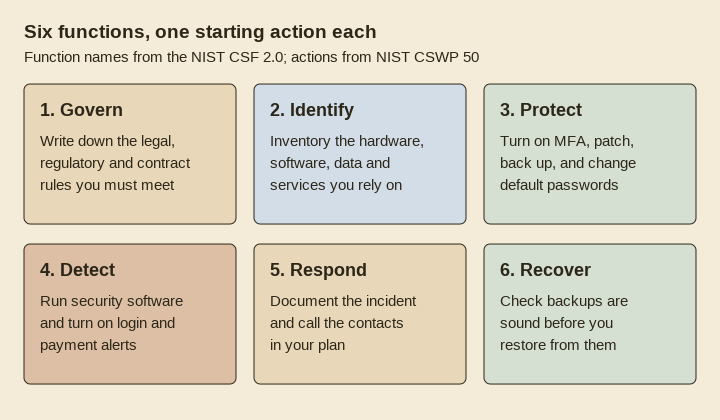 The six functions with one starting action each, paraphrased from the guide's tables. Data: NIST CSWP 50, 2 November 2026. Diagram by Warhawk Division.
Under each function is a table with four columns: "Actions to Consider," "Rationale," "Getting Started" and "Considerations as the Business Grows."
Here is how one row reads, for example. The action is "Change default manufacturer passwords." The rationale is that many devices, such as routers and printers, "come with default administrative passwords that are easily found or known by criminals and can be used to access the device." To get started, the guide says to "Review the security settings on all devices to ensure that unique, strong passwords are created." As the business grows, it says to "Establish and regularly review policies and procedures for onboarding and managing devices."
The guide also draws a picture of a typical one-person firm: a desktop computer, "a Wi-Fi-enabled printer," a laptop and a phone, and perhaps an external hard drive for backups. Even with that short list, it says, "there are still quite a few opportunities for cyber criminals to compromise the business."
What does it say about phishing and AI tools?
The guide gives four "Tips for Spotting a Phish." The first is "Treat all attachments and links with caution." Another says to verify a request "by using known or public contact information, not the message itself." The site's article "Phishing: How to Read an Email Before You Click" covers the habit in detail.
The guide also has a short section on AI. It uses a new term there: "Super Intelligence (SI)." A footnote explains that on 29 September 2026 an executive order "directed executive agencies to update its use of 'artificial intelligence' to 'super intelligence.'" In this guide the term refers to the same products most readers call AI tools, the ones the guide says "are often used to write code, automate workflows, generate content, or provide customer support."
The precautions it lists include "Conducting an inventory" of every such product the business uses, "Reviewing" a tool's "privacy and security settings" to understand "how data is used, stored, and shared, especially before entering any sensitive information," and "Creating a process to ensure that all SI-generated content is reviewed before use."
What does the guide not cover?
The guide is direct about its limits.
- It says it "is not all-encompassing," and that carrying out a strategy "will vary based on the organization's sector, size, resources, and contractual or regulatory requirements."
- It says the tables are "not intended to be a checklist or compliance criteria."
- It says "Privacy is generally beyond the scope of this publication."
- Its closing notice says that where equipment or software is identified, that "does not imply recommendation or endorsement of any product or service by NIST."
- On hiring help, it says businesses that outsource "are not transferring their accountability or responsibility for protecting their systems and data."
- On insurance, it says "Having cybersecurity insurance does not eliminate the need for a cybersecurity strategy."
In the news release, Eliot said the same: "The publication is not comprehensive and won't address all the needs of every solopreneur." The worksheets and three example businesses are in a separate spreadsheet of appendices. I read the main document and its list of appendices, not the spreadsheet itself.
What to do
These steps repeat the guide's own "Getting Started" advice. On insurance, the guide says to speak "to a trusted agent," and on notifying customers after an incident it says to consider "input from legal counsel." This article gives no legal or insurance advice.
- Download the guide from NIST. It is free at the address in the Sources list.
- Start an inventory. The guide says to begin "by inventorying the most important hardware, software, data, and services on which the business depends," and adds: "Do not overlook non-IT equipment connected to the network (e.g., security cameras, audio-visual equipment)."
- Turn on MFA. The guide says to "Review all account settings to enable MFA, especially phishing-resistant MFA."
- Update. "Enabling automatic updates can help manage updates. Make a habit of routinely checking for available updates at least monthly."
- Back up and test. "Consider having multiple data backups with at least one on a medium that is not connected to the device," the guide says, and "Periodic testing can provide confidence that the backups will restore data when needed."
- Use a standard account for daily work. The guide says to "Use a standard user account on devices instead of administrator (admin) accounts to perform routine work functions."
- Write the contact list. "Keep a printed or offline copy of important contacts."
What to remember
- NIST CSWP 50, dated 2 November 2026, is a free cybersecurity guide for businesses with no employees other than the owner.
- It opens with nine actions, led by phishing-resistant MFA, and then lays out more under six functions.
- Each action comes with a reason, a first step, and a note for when the business grows.
- It says plainly that it is a starting point, not a checklist and not a compliance standard.
- It uses the federal government's new term "Super Intelligence (SI)" for what most people call AI.
NIST invites more examples. The guide says small business use cases can be sent to smallbizsecurity@nist.gov "to be considered for inclusion in a public library of use cases."
Sources (3)
- NIST, "Self-Employed? Solopreneur? NIST Has a Cybersecurity Guide Just for You" (news release), 2 November 2026
- NIST, "Small Business Cybersecurity: Non-Employer Firms" (NIST CSWP 50), 2 November 2026
- NIST Computer Security Resource Center, "CSWP 50, Small Business Cybersecurity: Non-Employer Firms" publication page, November 2026