Articles & BlogBy Trapper W. Brown8 min read
For anyone who uses "the cloud" every day and could not say where it is. By the end you will be able to sort any cloud service into one of three kinds and say who runs which part of it.
Your photos are "in the cloud." So is your email, your game saves, and probably your school or work files. The word makes it sound like your data floats somewhere above the weather.
It does not. It sits on a disk, in a computer, in a building, and that computer belongs to somebody else. The old joke among administrators is that the cloud is only someone else's computer. The joke is true, but it leaves out the part that made the cloud worth a name: how you rent that computer, and how little of it you have to run yourself.
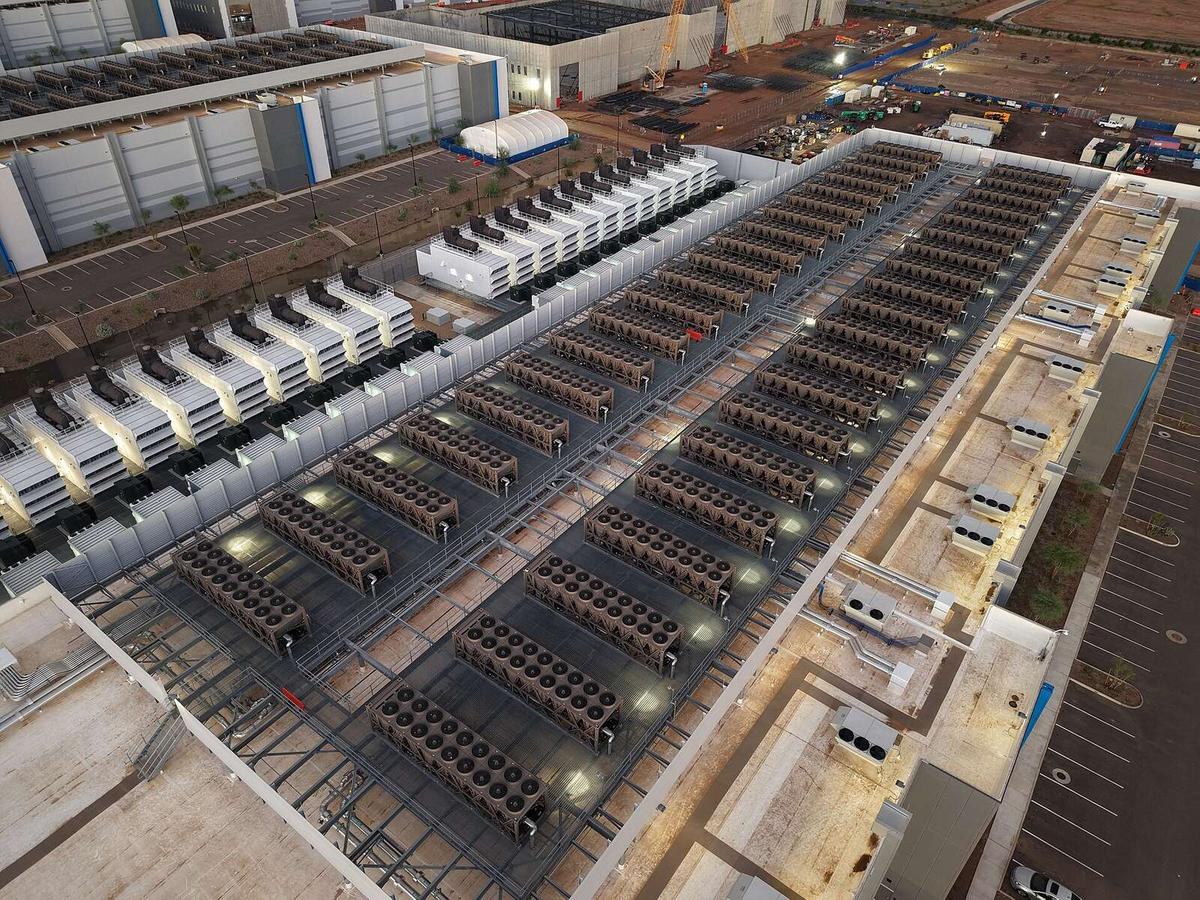 The roof of a data center: cooling units and backup generators. This is what the cloud looks like from above. Photo by Rsparks3, CC0, via Wikimedia Commons.
What does NIST say the cloud is?
The definition you will see quoted most often is a short one. In September 2011 the US National Institute of Standards and Technology published Special Publication 800-145, The NIST Definition of Cloud Computing. Its core sentence calls cloud computing a model for on-demand network access to a shared pool of computing resources that can be "rapidly provisioned and released with minimal management effort or service provider interaction."
NIST then says the model has five essential characteristics, three service models and four deployment models. The five characteristics are the test. If a service has all five, it is cloud. If it is missing some, it is ordinary hosting with a modern label.
| Characteristic | Plain meaning |
|---|---|
| On-demand self-service | You get a server or storage by clicking, with no phone call to a salesperson |
| Broad network access | You reach it over the network from a phone, a tablet or a laptop |
| Resource pooling | Many customers share the same hardware, and you usually do not know which machine is yours |
| Rapid elasticity | You can grow or shrink what you use in minutes, and the supply looks endless |
| Measured service | Use is metered, like electricity, and you typically pay for what you used |
Pooling is the one to notice. NIST says the customer "generally has no control or knowledge over the exact location" of the resources, though you may be able to pick a country or a data center. You are a tenant in a very large building, and the walls between tenants are made of software.
Three ways to rent: IaaS, PaaS and SaaS
How much of the computer do you want to run yourself? That one question separates the three service models. Think of a stack of layers, with the building at the bottom and your data at the top.
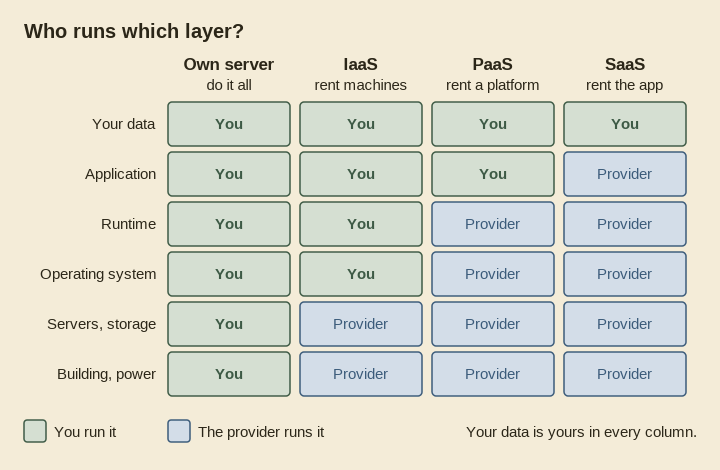 The further right you go, the less you run, and the less you control.
Infrastructure as a Service (IaaS) rents you the raw parts: processing, storage and networks. In NIST's words you can "deploy and run arbitrary software," including the operating system. You get a virtual machine, which is a pretend computer carved out of a real one, and from the operating system up it is yours to install, patch and break. Amazon describes its EC2 virtual machines as IaaS, and Microsoft lists Azure Virtual Machines the same way.
Platform as a Service (PaaS) rents you a place to run your own program. You hand over the code. The provider supplies the operating system and the runtime, which is the layer of languages and libraries a program needs in order to start. Microsoft's own examples are Azure App Service and Azure SQL Database: you bring a website or a set of tables, and never log in to the server under them.
Software as a Service (SaaS) rents you a finished application. You open a browser and use it. NIST's example is web-based email, and Microsoft lists Microsoft 365. You control your account and a few settings, and nothing below that.
| Model | You bring | The provider runs | An everyday example |
|---|---|---|---|
| IaaS | Operating system, programs, data | Hardware, network, building | A virtual machine you rent to host a game server |
| PaaS | Your program and its data | All of the above plus the operating system and runtime | A hosted database, or a service that runs your website's code |
| SaaS | Your data and your account | Everything, including the application | Webmail, online documents, a photo library |
Here is a five-minute exercise that needs no tools. Write down every cloud service you used this week and mark each one I, P or S. Most people find a page of SaaS and nothing else. That is normal. IaaS and PaaS are what the people who build those services rent.
Whose cloud is it? The four deployment models
The service model says how much you run. The deployment model says who else is in the building.
- Public cloud is open to anyone with a payment card and, as NIST puts it, sits on the provider's premises. This is what people usually mean by "the cloud."
- Private cloud is built for one organization. It can sit in that organization's own server room or in a rented one. What makes it cloud is the five characteristics, with the organization's own departments as the tenants.
- Community cloud is shared by a group of organizations with the same concerns, such as the same security rules.
- Hybrid cloud is two or more of the above joined so data and programs can move between them.
Where do the computers live?
In buildings like the one in the photograph, grouped into what providers call regions. Amazon's definition is the clearest I have read: a Region is "a physical location around the world where we cluster data centers." Inside each Region are at least three Availability Zones, and a zone is one or more separate data centers with its own power and network. Amazon says the zones in a Region sit many kilometers apart, yet all within 100 km of one another. When I read its page in November 2026 it counted 124 zones in 39 Regions.
Why does a beginner care? Because the region you pick decides three things. It decides speed, since nearer is faster. It decides which country's laws reach your data. And it decides what a single fire, flood or power failure can take down. Spreading a service across zones is how providers and their customers plan for the day one building goes dark.
Tip
When you sign up for any service that holds data you care about, look in the settings or the help pages for the words "region" or "data location" before you upload. Changing it later is usually harder than choosing it first.
What do you gain, and what do you give up?
Renting beats owning for the same reasons it does with cars. You pay nothing up front. You can have a server in minutes and hand it back in an hour. Someone else replaces the failed disks, guards the door and keeps the generators fueled, and at a scale a small clinic or a three-person studio could never match.
The cost is control, and it comes in four parts.
| You gain | You give up |
|---|---|
| No hardware to buy or repair | Knowing exactly where your data is |
| Capacity in minutes, on demand | A fixed, predictable bill: the meter always runs |
| The provider's physical security and staff | The option to fix an outage yourself |
| Access from anywhere | Easy exit: moving to another provider takes real work |
The meter cuts both ways. Measured service means a small project costs very little. It also means a forgotten test server keeps billing until someone turns it off.
Watch out
Renting the computer does not hand off responsibility for what you put on it. The provider secures the building and the hardware. Your password, your sharing settings and your data are still yours to protect, under every model. The leaks described in the next article all start on the customer's side of that line.
What to remember
- The cloud is real computers in real buildings, owned by someone else and rented to many customers at once.
- NIST SP 800-145 gives the test: self-service, network access, pooling, elasticity and metering.
- IaaS rents machines, PaaS rents a place to run your code, SaaS rents a finished application.
- Public, private, community and hybrid describe who shares the hardware.
- Providers group data centers into regions and zones. The region you choose affects speed, law and what one disaster can reach.
- You gain speed and scale. You give up location, control and a fixed bill. You never give up responsibility for your own data and accounts.
If virtual machines are new to you, Virtual Machines and Containers explains the pretend computer that IaaS rents out. Then read The Shared Responsibility Model in Plain Terms, which takes the line from the warning above and draws it properly: who secures what, layer by layer, and where customers most often get it wrong.