Articles & BlogBy Trapper W. Brown8 min read
For anyone who has heard "just run it in Docker" or "spin up a VM" and nodded without being sure of the difference. By the end you will know what each one is, when to use which, and how far to trust the wall between them.
One physical computer used to mean one operating system and whatever ran on it. If you wanted a web server and a game server kept apart, you bought two machines.
Virtualization ended that. It means using software to split one physical computer into several isolated environments, each of which behaves as if it had the machine to itself. There are two main ways to do it, the virtual machine and the container, and they draw the dividing line in very different places.
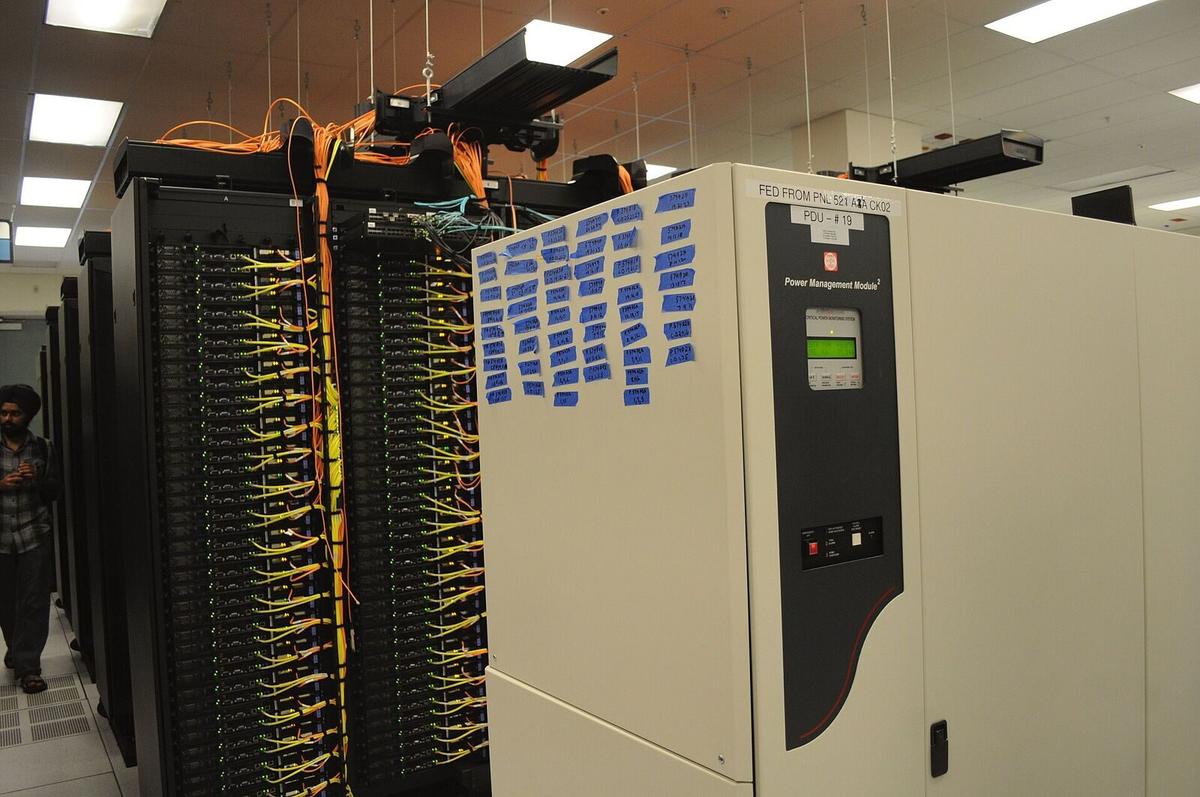 Racks like these are where virtualization pays off: one physical server can host many virtual ones. Photo by Derrick Coetzee, CC0, via Wikimedia Commons.
What is a hypervisor?
A hypervisor is the program that creates and runs virtual machines. It hands each one a slice of the real processor, memory and disk, and keeps them from touching each other. The real computer is the host. Each virtual machine is a guest.
Hypervisors come in two types, named for where they sit.
| Type 1 (bare metal) | Type 2 (hosted) | |
|---|---|---|
| Runs on | The hardware directly | An ordinary operating system, as an application |
| Examples | VMware ESXi, Microsoft Hyper-V, KVM (part of the Linux kernel), Proxmox VE (built on KVM) | Oracle VirtualBox, VMware Workstation |
| Typical home | Servers and data centers | Your desktop or laptop |
| Good for | Running many machines all day | Trying things out, labs, one or two VMs |
The line between the types is blurrier than the table suggests, and people argue about where KVM belongs. What matters is the idea: type 1 is the foundation of a server, type 2 is a program you open.
What does a virtual machine give you?
A virtual machine, or VM, is a complete pretend computer. It has virtual hardware, and on that hardware you install a full operating system with its own kernel. The kernel is the core of an operating system, the part that talks to hardware and decides what every program may do.
Three things follow from that design:
- A whole computer in a file. The VM's disk is a file on the host. You can copy it, back it up or move it to another machine.
- Snapshots. A snapshot saves the VM's disk and settings at one moment. Break something, restore the snapshot, and the VM is exactly as it was.
- Isolation. A guest sees only its virtual hardware. A Windows guest can run on a Linux host, and a crash or infection inside the guest stays there in all but rare cases.
The price is weight. Every VM carries a full operating system that needs memory, disk space, a minute to boot and its own security updates.
What is a container?
A container isolates a single application, not a whole computer. It packages a program with the libraries and settings it needs, and runs it as an isolated process on the host. It brings no kernel of its own. Every container on a machine shares the host's kernel, which uses features called namespaces and control groups to give each one its own view of files, network and processes, and a limit on resources.
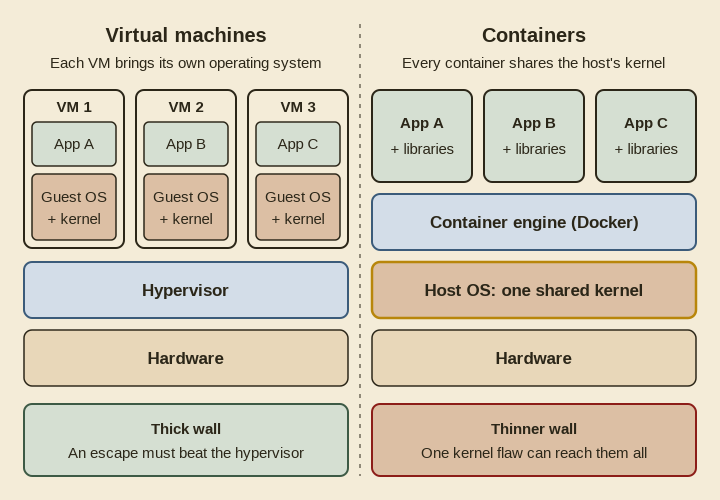 A VM brings its own operating system. A container borrows the host's kernel.
Two words get mixed up constantly. Docker's documentation defines an image as a read-only template with instructions for creating a container, and a container as a runnable instance of an image. The image is the recipe and the container is the meal. You can cook many containers from one image, and throwing a container away leaves the image untouched.
Docker is the best-known container engine: the software that downloads images, starts containers from them and connects them to the network. By default it fetches images from Docker Hub, a public registry.
Because containers share a kernel, Linux containers need a Linux kernel. On Windows and macOS, Docker Desktop supplies one by quietly running a small Linux virtual machine. The two technologies are stacked more often than they compete.
The same small website, both ways
Say you want to serve a small website with nginx, a web server.
The VM way. Create a VM with 2 GB of memory and a 20 GB disk. Install a Linux distribution, which takes perhaps fifteen minutes. Log in, install nginx, copy your site in. You now own a second operating system to patch for as long as the site lives.
The container way. With Docker installed, it is one line:
docker run -d --name web -p 127.0.0.1:8080:80 nginx
This downloads the nginx image if you do not have it, starts a container from it in the background, names it web, and connects port 8080 on your own computer to port 80 inside the container.
curl -I http://localhost:8080
This asks the new web server for its response headers.
HTTP/1.1 200 OK
Server: nginx/1.29.3
Your version number will differ. A 200 OK means it is serving.
| Command | What it does |
|---|---|
docker ps | Lists running containers |
docker stop web | Stops the container named web |
docker start web | Starts it again |
docker rm web | Deletes the stopped container. The image stays. |
docker images | Lists the images stored on this machine |
Tip
The 127.0.0.1: in front of the port matters. With it, only your own computer can reach the container. Leave it off, as in -p 8080:80, and Docker publishes the port on every network interface, which can expose a test site to your whole network.
A game server works the same way. If the publisher offers a Linux server, a container gets you running in minutes and makes an update as simple as starting a newer image. If the server software only runs on Windows and your host is Linux, a container cannot help, because there is no Windows kernel to share. That one needs a VM.
Docker's own figures show the difference in weight: it describes container images as typically tens of megabytes, and VMs, each with a full copy of an operating system, as taking up tens of gigabytes.
Which wall is stronger?
Both isolate. They do not isolate equally.
For a program to break out of a VM, it has to defeat the hypervisor, a fairly small piece of software with a narrow job. Such escapes have been found and fixed over the years, and each one is treated as a serious event.
A container's wall is the host's kernel itself, and every container is talking to that same kernel all day. A single kernel flaw, or one careless setting, can let a process inside a container reach the host and every other container on it. Docker's documentation is direct about the stakes: its background service runs with root privileges unless you choose its rootless mode, and only trusted users should be allowed to control it.
Watch out
The beginner's mistake is treating a container as a safe box for software you do not trust. An unknown image from the internet runs on your kernel. Options such as --privileged, or handing a container access to the Docker control socket, remove most of what wall there is. For anything hostile or unknown, such as a malware sample or a deliberately vulnerable practice target, use a virtual machine.
When should you use which?
| You want to | Use | Why |
|---|---|---|
| Run a different operating system (Windows on Linux, or the reverse) | VM | A container cannot bring its own kernel |
| Test something risky, then undo it | VM | Snapshots, and the stronger wall |
| Build a security practice lab | VM | The targets are meant to be broken into |
| Run several small services on one server | Containers | Light, quick to start, easy to update |
| Ship an application with everything it needs | Containers | The image runs the same everywhere |
| Keep strangers' workloads apart | VMs, often with containers inside | Sharing a kernel with strangers is a risk |
I reach for a container when I trust the software and want convenience, and a VM when I do not trust it or need a different operating system.
What to remember
- Virtualization splits one physical computer into several isolated ones.
- A hypervisor runs VMs. Type 1 sits on the hardware, type 2 runs as a program on your normal system.
- A VM is a whole computer in a file, with its own operating system and kernel. It is heavy and strongly isolated.
- A container is one application and its libraries, sharing the host's kernel. It is light and less strongly isolated.
- An image is the template. A container is a running copy of it.
- Docker is a container engine. On Windows and macOS it runs inside a small Linux VM.
- Trusted software and convenience: container. Untrusted software or another operating system: VM.
To put the VM half of this to work, "Kali in a Virtual Machine: A Legal Home Lab" builds a two-machine lab in VirtualBox step by step. If the Linux inside these machines is the unfamiliar part, start with "What Is Linux?".