Articles & BlogBy Trapper W. Brown11 min read
For anyone who has seen "TCP" and "UDP" in a router menu or a game's port list and nodded along. By the end you will be able to read a handshake, say which of the two a given job wants, and list the connections on your own computer.
An IP address gets a packet to the right machine. It does not get the packet to the right program on that machine, and it makes no promise that the packet arrives at all. Two more pieces of the internet handle those jobs: the Transmission Control Protocol (TCP) and the User Datagram Protocol (UDP).
Nearly everything you do online rides on one of the two. They make opposite bargains. TCP spends extra messages to be sure. UDP spends none and leaves the checking to the program. Knowing which is which explains why a download never arrives with a hole in it, and why a voice call drops a syllable when the Wi-Fi stutters but keeps going.
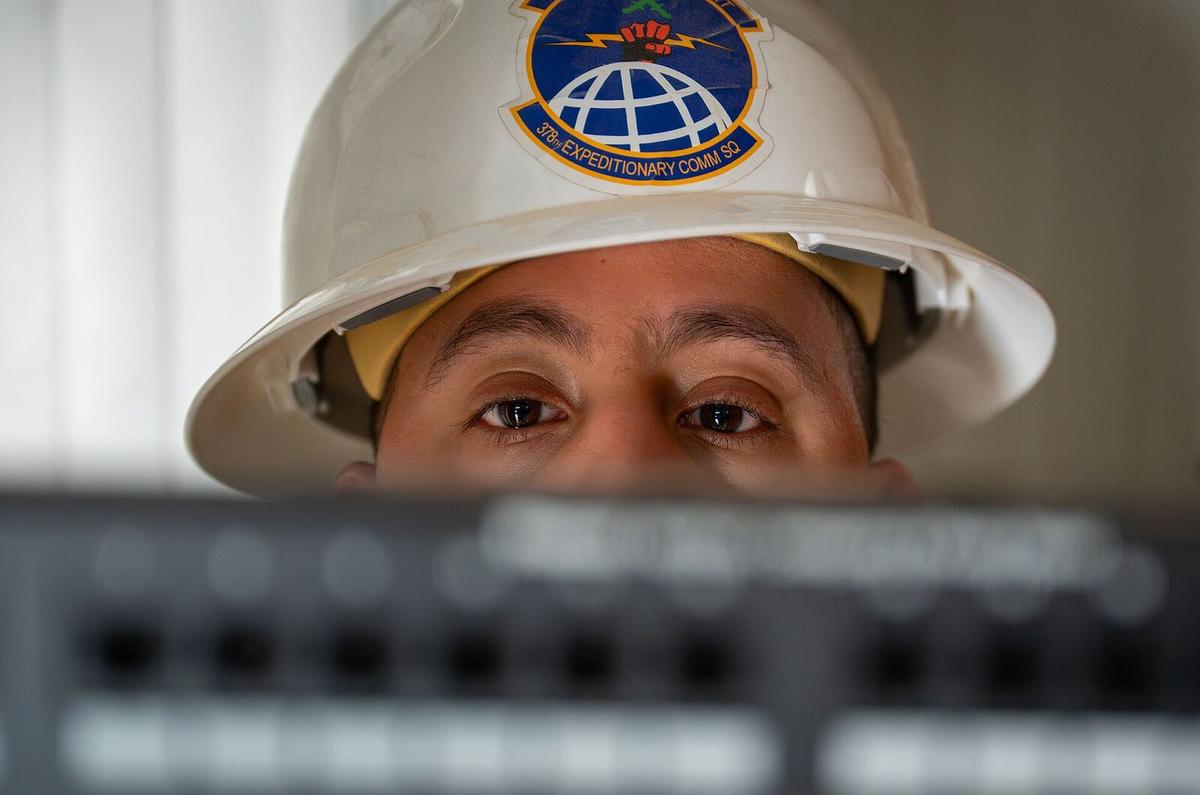 The sockets on a rack like this are physical ports. The ports in this article are numbers, and one cable can carry thousands of them at once. U.S. Air Force photo by Senior Airman Kevin Dunkleberger, public domain, via Wikimedia Commons.
Where do TCP and UDP sit?
The article "The OSI Model: Seven Layers, One Web Page" lays networking out as a stack of layers. TCP and UDP are layer 4, the transport layer. Below them, IP moves packets from one address to another. Above them sit the programs: a browser, a mail app, a game.
The standards that define them are public and free to read. TCP is in a document called RFC 9293, published in August 2022, which replaced the original, RFC 793, from 1981. UDP is in RFC 768, dated 28 August 1980 and still in force. It is three pages long.
What is a port?
A port is a number that says which program on a machine a message is for. Both TCP and UDP put two of them at the front of every message: a source port and a destination port. Each is 16 bits, which gives 65,536 possible values, numbered 0 to 65,535.
The article "IP Addresses, Ports and Your Home Router" introduces ports and lists the common ones. What it leaves for this article is how the numbers are organized. The body that keeps the list, the Internet Assigned Numbers Authority (IANA), splits them into three ranges:
| Range | Name | What it is for |
|---|---|---|
| 0 to 1023 | System ports, also called well-known ports | Long-established services, such as 443 for secure web pages and 53 for DNS |
| 1024 to 49151 | User ports, also called registered ports | Services registered with IANA by their makers |
| 49152 to 65535 | Dynamic ports, also called ephemeral ports | Never assigned. Your own machine borrows one for each outgoing connection |
That last row matters. When your laptop opens a web page, the server's end is port 443. Your end is a number your operating system picks for that one conversation. The reply comes back to that number, which is how two browser tabs talking to the same site keep their pages apart.
In TCP's standard, an address and a port together are called a socket, and "a connection is defined by a pair of sockets": your address and port, plus the server's address and port. Change any of the four and it is a different connection.
What happens in the three-way handshake?
Before TCP carries any data, the two ends exchange three short messages. RFC 9293 calls this "the procedure used to establish a connection." The messages are named for the flags set in them. A flag is a single bit in the TCP header that is either on or off. SYN means "synchronize sequence numbers." ACK means the acknowledgment field counts.
Using the example numbers from the standard itself:
- SYN. Your laptop sends a segment with the SYN flag on and a starting sequence number, 100. In plain words: I want to connect, and I will count my bytes starting from here.
- SYN, ACK. The server answers with both flags on. Its own starting number is 300, and its acknowledgment number is 101. That means: agreed, I count from 300, and the next thing I expect from you is 101.
- ACK. Your laptop replies with sequence number 101 and acknowledgment 301. Now each side has stated its starting number and has heard the other side repeat it back, plus one.
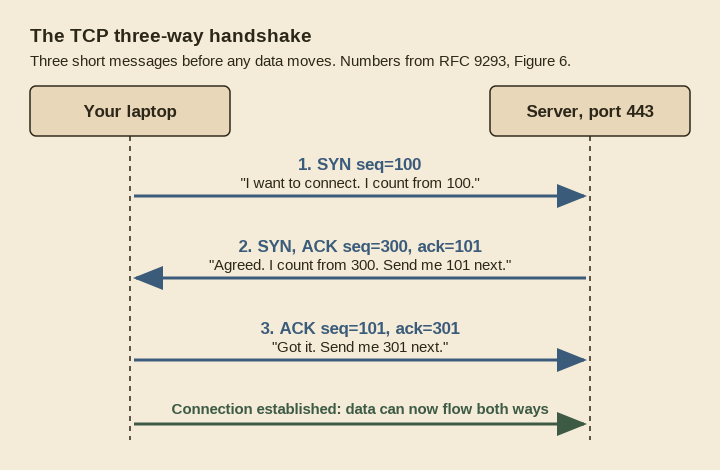 Three messages, two starting numbers, and each side proves it heard the other.
Why three and not two? The standard gives the reason: "to prevent old duplicate connection initiations from causing confusion." A stray SYN from an earlier attempt can show up late. With the third message, the server knows the request is live, because a real client answers with the right number and a stale one cannot.
Closing is as deliberate as opening. The FIN flag means "no more data from sender," and each side sends its own. The RST flag, for reset, ends a connection at once. It is what comes back when you knock on a port where no program is listening.
How does TCP keep its promise?
RFC 9293 states the promise in one line: TCP "provides a reliable, in-order, byte-stream service to applications." It keeps that promise with the numbers set up in the handshake. In the standard's words, reliability "consists of detecting packet losses (via sequence numbers) and errors (via per-segment checksums), as well as correction via retransmission."
Here is a worked example. Suppose your laptop sends 3,000 bytes in three segments of 1,000, starting at sequence number 101.
- Segment one carries bytes 101 to 1,100. It arrives. The server acknowledges 1,101, meaning "send me 1,101 next."
- Segment two carries bytes 1,101 to 2,100. It is lost on the way.
- Segment three carries bytes 2,101 to 3,100. It arrives, but the server is still waiting for 1,101, so it holds what it has.
- Your laptop's timer for segment two runs out with no acknowledgment. It sends bytes 1,101 to 2,100 again.
- The server now has everything, passes it up to the program in order, and acknowledges 3,101.
The program above never sees the gap. It also waits: nothing after the hole is delivered until the hole is filled. Keep that in mind for the section on QUIC.
Two more fields do quiet work. The checksum lets the receiver detect a segment damaged in transit. The window is the receiver saying how many more bytes it is "willing to accept" right now, so a fast sender does not bury a slow receiver.
What does UDP leave out?
Nearly all of that. RFC 768 says UDP lets programs send messages "with a minimum of protocol mechanism," and adds that "delivery and duplicate protection are not guaranteed." Its header has four fields: source port, destination port, length and checksum. There is no handshake, no sequence number, no acknowledgment and no resending.
| TCP | UDP | |
|---|---|---|
| Setup before data | Three-way handshake | None |
| Lost data | Detected and sent again | Gone, unless the program handles it |
| Order | Delivered in order | As it arrives |
| Typical jobs | Web pages, email, file transfers, remote logins | DNS lookups, clock setting, live voice and video |
Why would anyone choose the one that promises less? Because being sure costs time, and some data is worthless late.
For example, take a bank transfer and a video call. For the transfer, every byte must arrive and a half-second delay bothers no one, so TCP's bargain is the right one. For the call, a slice of sound that shows up half a second late is useless: the conversation has moved on. It is better to skip it and play the next one. The standard for carrying live audio and video, RFC 3550, says applications "typically run" it "on top of UDP". A quick lookup such as "what is the address for this website" also fits UDP: one short message out, one back, and if no answer comes the program asks again.
Where does QUIC fit?
QUIC is a newer transport protocol, standardized in May 2021 as RFC 9000. Its full title says where it sits: "A UDP-Based Multiplexed and Secure Transport." QUIC packets travel inside UDP messages. On top of that plain carrier, QUIC rebuilds what TCP provides (a connection, reliable delivery, flow control) and changes three things.
Encryption is built in. With TCP, a secure web page needs the TCP handshake and then a second handshake for encryption, called TLS, which the article "HTTPS and Certificates: What the Padlock Means" explains. RFC 9000 says QUIC "integrates the TLS handshake," so setup and encryption happen together.
Streams do not block each other. A web page is many files. Sent over one TCP connection, a single lost segment holds up everything behind it, as in the worked example. QUIC carries separate streams, and RFC 9000 lists as a benefit that when a packet is lost, "only streams with data in that packet are blocked."
A connection can move. A TCP connection is tied to its four numbers. QUIC uses connection identifiers, which, the standard says, "allow connections to transfer to a new network path," as when a phone leaves Wi-Fi for mobile data.
HTTP/3, the version of the web's protocol defined in RFC 9114 in June 2022, runs on QUIC.
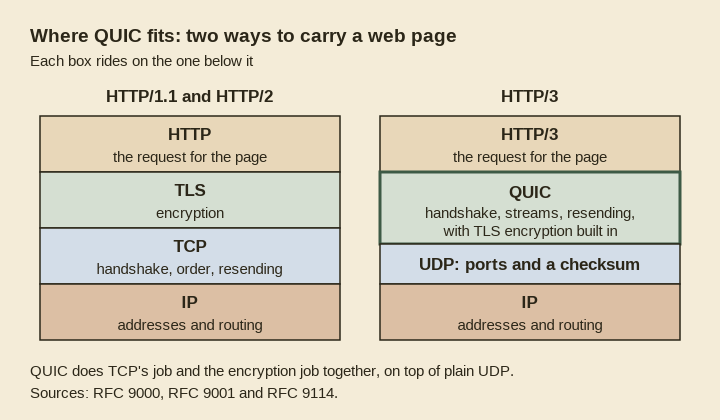 Older web traffic stacks TLS on TCP. HTTP/3 puts QUIC on UDP and folds the encryption in.
How can you see your own connections?
Every operating system can list them. The commands below only read and print. They change nothing.
On Windows, open Command Prompt or PowerShell and type:
netstat -an
This shows all active TCP connections and the TCP and UDP ports the computer is listening on, with addresses and ports as plain numbers.
On Linux, the matching command is:
ss -tuna
This asks for TCP sockets (t), UDP sockets (u), numbers in place of names (n), and all of them, listening or connected (a).
The Windows output looks like the lines below. This is an example with made-up addresses in the real format. Yours will be longer.
Active Connections

  Proto  Local Address          Foreign Address        State
  TCP    0.0.0.0:445            0.0.0.0:0              LISTENING
  TCP    192.168.1.23:52114     203.0.113.10:443       ESTABLISHED
  UDP    0.0.0.0:5353           *:*
Read it with what you now know. The first line is a program waiting for incoming connections on port 445. The second is a finished handshake: your machine, from dynamic port 52114, to a web server's port 443. The third is UDP. It has no state column entry and no far end, because UDP has no connection to be in a state.
Watch out
A line that says LISTENING is a door, and 0.0.0.0 means it faces every network the machine is on. Do not start closing ports because of a guide like this one. Find out which program owns the port first. "Firewalls, NAT and Port Forwarding" explains what stands between those doors and the internet.
Tip
To watch a real handshake, open the capture tool described in "Wireshark: Reading Network Traffic" on your own machine and load a web page. The first three TCP packets to the server are the SYN, the SYN and ACK, and the ACK.
What to remember
- A port is a 16-bit number that names a program on a machine. Servers wait on known ports. Your machine borrows a dynamic port, 49152 or higher, for each outgoing connection.
- TCP opens with three messages: SYN, then SYN and ACK, then ACK. Each side states a starting number and hears it confirmed.
- TCP numbers every byte, acknowledges what arrives and resends what does not. The cost is waiting.
- UDP has ports, a length and a checksum, and nothing else. Lost is lost, which suits live calls and quick lookups.
- QUIC runs on UDP, rebuilds reliability there, builds in encryption and keeps one lost packet from stalling every stream. HTTP/3 uses it.
netstat -anon Windows andss -tunaon Linux list your own connections without changing anything.
Run the command, find one ESTABLISHED line, and work out which end is yours and which service is on the other. Once you can read one line, a firewall rule or a port forward reads the same way. To see where packets go between your port and the server's, read "How the Internet Finds a Path: BGP, Route Leaks and Hijacks".
Sources (10)
- IETF, RFC 9293, "Transmission Control Protocol (TCP)", August 2022
- IETF, RFC 768, "User Datagram Protocol", 28 August 1980
- IETF, RFC 9000, "QUIC: A UDP-Based Multiplexed and Secure Transport", May 2021
- IETF, RFC 9001, "Using TLS to Secure QUIC", May 2021
- IETF, RFC 9114, "HTTP/3", June 2022
- IETF, RFC 3550, "RTP: A Transport Protocol for Real-Time Applications", July 2003
- IETF, RFC 6335, "Internet Assigned Numbers Authority (IANA) Procedures for the Management of the Service Name and Transport Protocol Port Number Registry", August 2011
- IANA, "Service Name and Transport Protocol Port Number Registry", last updated 10 November 2026
- Microsoft Learn, "netstat" command reference
- Linux man-pages project, "ss(8): another utility to investigate sockets"