Articles & BlogBy Trapper W. Brown10 min read
Encryption is the math that turns readable information into noise for everyone except the people who hold the right key. Not long ago most people met it a few times a day, at a bank login or a checkout page. Today it runs almost every time a device talks or stores anything: each web page, each message, each photo saved on a phone.
That matters to you because the labels have multiplied and the marketing has not gotten any clearer. "Military grade," "256 bit," "end to end" and "quantum safe" all show up on product pages. Some of those words carry real meaning and some are decoration. This guide is a map of what is in use as of November 2026, where you meet each piece, and how to read the labels. It builds on Encryption and Hashing in Plain Terms, which explains what a key, a cipher and a hash are, so none of that is repeated here. Four companion guides, named along the way, go deeper into each region of the map.
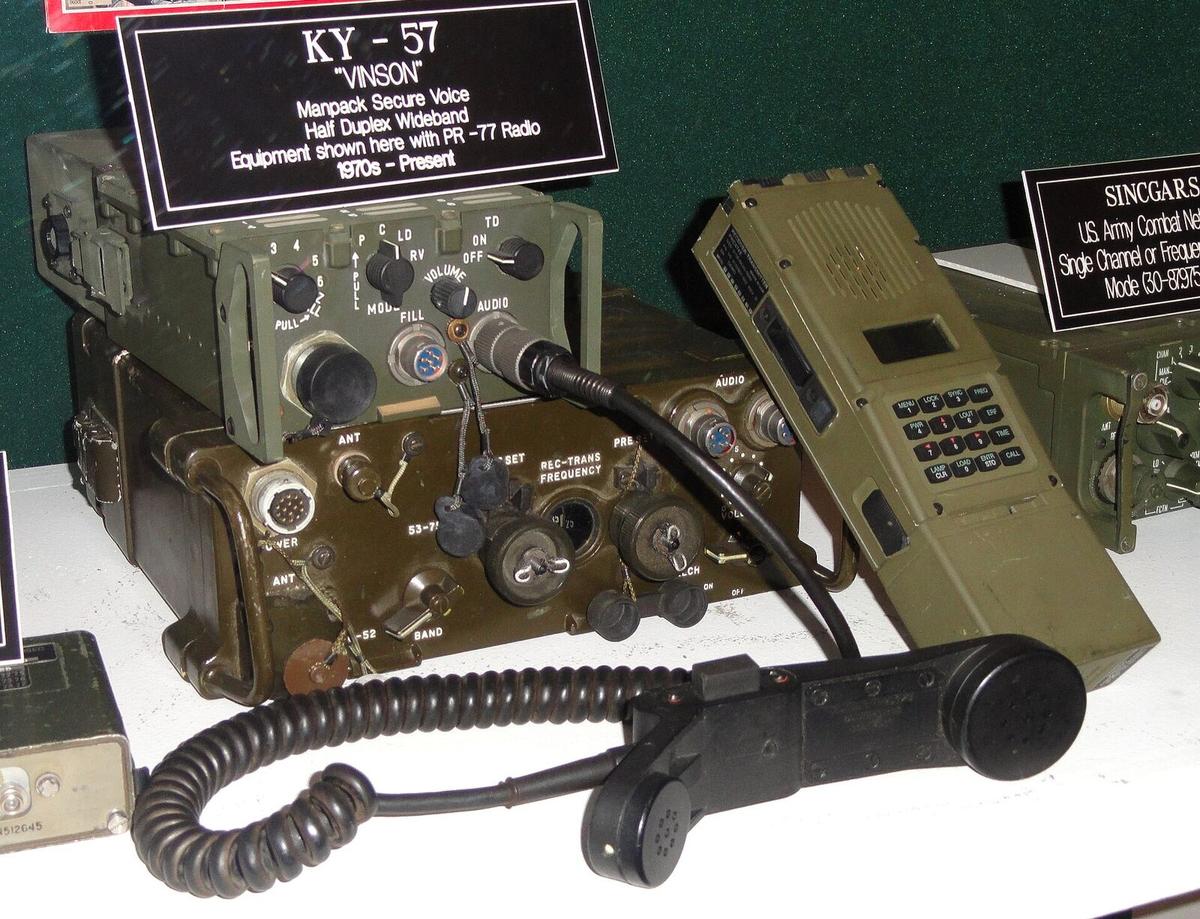 Encryption used to be a separate box that a soldier carried and plugged into a radio. Now it is built into every phone and browser. Photo by Daderot, CC0, via Wikimedia Commons.
What are the three jobs encryption has to do?
Nearly every secure system, from a web browser to a chat app, has to do the same three jobs. Once you can name them, every product label gets easier to read.
Agree on a key. Two devices that have never met need a shared secret, and they have to create it over a network where anyone may be listening. This job uses asymmetric math, the kind built on key pairs.
Prove identity. Agreeing on a key with a stranger is worthless if the stranger is an impostor. A digital signature lets one side prove it holds a private key that nobody else has.
Protect the data. With a shared key in hand, both sides switch to a fast symmetric cipher for everything that follows. Symmetric means the same key locks and unlocks.
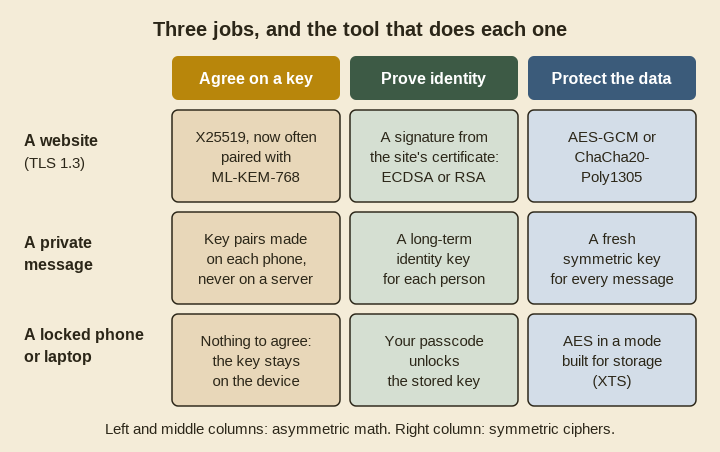 The same three jobs show up everywhere. Only the tools change.
The guide Symmetric and Asymmetric Encryption: One Key or Two explains the first two jobs and why systems always combine both kinds of math. The rest of this map shows which tools fill each box today.
What happens when you open a website?
The padlock in your browser means the connection uses Transport Layer Security, or TLS. The current version is TLS 1.3. Its specification was first published as RFC 8446 in August 2018 and was replaced by a cleaned-up edition, RFC 9846, in July 2026. (An RFC is a numbered document from the Internet Engineering Task Force, the body that writes the internet's technical rules.) HTTPS and Certificates: What the Padlock Means walks through the handshake step by step. Here is only the parts list.
For the key agreement, most connections use X25519, an elliptic curve method defined in RFC 7748 in January 2016. Each side sends the other a public value that is just 32 bytes long, and both arrive at the same secret. TLS 1.3 removed the older designs in which one long-lived key protected every session. In the specification's words, all of its key exchange methods "now provide forward secrecy," which means that stealing a server's key next year does not unlock traffic recorded today.
For identity, the server signs part of the conversation with the private key that matches its certificate. The specification requires support for two signature families: RSA and the elliptic curve method ECDSA.
For the data, TLS 1.3 names only three cipher suites in its required list. Software must support AES with a 128-bit key in Galois/Counter Mode, and should support AES with a 256-bit key in the same mode and ChaCha20-Poly1305. All three are "authenticated" ciphers: they hide the data and also detect any change to it. Galois/Counter Mode: Encryption That Notices Tampering explains how that second part works.
AES and ChaCha20: the two workhorses
Almost all the bulk encryption on the internet is done by one of two ciphers.
AES, the Advanced Encryption Standard, is published by the US National Institute of Standards and Technology (NIST) as FIPS 197. It dates from November 26, 2001, and NIST reissued it on May 9, 2023 with editorial improvements and, in its own words, "no technical changes to the algorithm." AES works on blocks of 128 bits at a time and takes a key of 128, 192 or 256 bits. Many processors have AES instructions built into the chip, which makes it very fast.
ChaCha20 is a stream cipher designed by the cryptographer Daniel J. Bernstein, whose paper introducing it is dated January 2008. The internet version is specified in RFC 8439, from June 2018. It uses a 256-bit key and is always paired with a partner called Poly1305 that does the tamper detection. Its selling point is speed on modest hardware. RFC 8439 says it is "around three times as fast" as AES on platforms that lack special AES hardware, which is why a budget phone or a small gadget may choose it.
Your browser and the server pick between them automatically. Neither is the "weak" option. Block Ciphers and Stream Ciphers: Two Ways to Scramble Data explains the difference in how the two work.
| What the label says | What it tells you | What it leaves out |
|---|---|---|
| AES-256 | The symmetric cipher and its key length | How the key was agreed, and where it is stored |
| TLS 1.3 | Data is protected between you and the server | What the server does with it afterward |
| End to end encrypted | Only the two ends hold the keys | Whether backups and attachments are covered |
| Military grade | Nothing specific | Everything |
| Post-quantum | New math is used for the key agreement | Which standard, and whether it is switched on |
What does "256 bit" actually mean?
A bit is one binary digit, a 0 or a 1. A 128-bit key is a string of 128 of them, so there are 2 to the power 128 possible keys. Written out, that is about 340 followed by 36 zeros.
Here is a worked example. Suppose an attacker could test one trillion keys every second, which is far beyond any ordinary computer. Trying every 128-bit key would take about 10 billion billion years (a 1 followed by 19 zeros). On average the right key turns up halfway through, which does not help much. A 256-bit key has 2 to the power 256 possibilities, a number 78 digits long. Nobody breaks modern encryption by guessing the key. They steal the key, guess a weak password, or find a flaw in the software around it.
There is a catch that trips up many people: bit counts only compare within the same kind of math. An asymmetric key needs to be much longer than a symmetric key to give the same protection. NIST's key management guide (SP 800-57 Part 1, Revision 5) rates a 3,072-bit RSA key and a 256-bit elliptic curve key as roughly equal to a 128-bit AES key. So "2048-bit RSA" is not sixteen times stronger than "128-bit AES." It is a little weaker. The companion guide on symmetric and asymmetric encryption has the full comparison.
As a rule of thumb, a product page that says "AES-256" and nothing else has told you about the strongest link in the chain and nothing about the others.
What protects a phone or laptop that is switched off?
Data sitting on a drive is called data at rest. Modern phones and most laptops can encrypt their whole storage, so a lost device is a brick to whoever finds it.
There is no second party here, so there is no key agreement. The job is done by a symmetric cipher alone. The method NIST approves for this is AES in a mode called XTS, described in SP 800-38E from January 2010. NIST published a draft revision of that document on September 3, 2026. XTS is built for the odd needs of a drive: any sector can be read or rewritten on its own without touching the rest. It hides data and, as NIST states plainly, it "does not provide authentication of the data or its source."
The key that protects the drive is itself locked by something you know, usually your passcode. That is the practical lesson. For example, a family whose child leaves a phone on the bus is protected by storage encryption only if the phone had a real passcode. A company with 200 laptops has the same math working for it, plus one more question: who holds the recovery keys, and where? Locking Down Your Phone in 20 Minutes covers the settings.
What does end to end mean in a messaging app?
TLS protects a message between your device and a company's server. On the server it is decrypted, and the company can read it, store it, or hand it over. That is how ordinary email and many chat services work.
End to end encryption closes that gap. The keys are created on the devices at each end and never leave them. The server in the middle relays ciphertext it cannot open. One openly documented design is the Signal protocol, whose specifications are published for anyone to read. They describe two main parts. One is a key agreement between two phones, built on the same elliptic curve methods TLS uses, with a newer version that adds post-quantum protection. The other, called the Double Ratchet, derives a fresh symmetric key for every single message, so one stolen key exposes one message and not the whole history.
I will not rank apps. Here is how to judge one yourself:
- Is end to end encryption on by default, or do you have to find a setting?
- Does it cover group chats, attachments and cloud backups, or only one to one text?
- Has the maker published how the protocol works, so outsiders can check it?
- Can you compare a safety number or code with your contact, to confirm nobody is sitting in the middle?
What is changing right now?
One region of the map is being redrawn. The asymmetric math behind key agreement and signatures (RSA and elliptic curves) could be broken by a large quantum computer, a kind of machine that does not exist yet. The symmetric ciphers are in much better shape.
The replacement is already rolling out. NIST approved its first three post-quantum standards on August 13, 2024. In August 2026, RFC 10024 defined a way for TLS 1.3 to run X25519 and a new method called ML-KEM-768 side by side, so a connection stays safe if either one holds. The cost is size: the browser's opening key share grows from 32 bytes to 1,216. NIST's transition report, finalized in October 2026, says it will deprecate the older public-key methods after 2030 and disallow them under its standards after 2035.
For most readers this change arrives through ordinary software updates. Quantum Computing and the Risk to Encryption explains what is at stake and what to do.
What to remember
- Every secure system does three jobs: agree on a key, prove identity, protect the data. The first two use asymmetric math and the third uses a symmetric cipher.
- On the web the current standard is TLS 1.3. It agrees keys with elliptic curves, increasingly paired with ML-KEM, and protects data with AES-GCM or ChaCha20-Poly1305.
- AES and ChaCha20 are both sound. Your devices choose between them for speed.
- "256 bit" describes one key in one cipher. It says nothing about passwords, key storage or what a server does with your data.
- Storage encryption protects a lost device only as well as its passcode does.
- End to end encryption means the service in the middle cannot read the content. Check that it is on by default and covers backups.
A good next step is to click the padlock on any site you use and find the connection details. Most browsers will show the protocol version and the cipher. Once you can pick out "TLS 1.3" and "AES" or "ChaCha20" in that line, the other four guides in this set will each fill in one more word of it.