Articles & BlogBy Trapper W. Brown7 min read
For anyone who uses a chat assistant to tidy an email, sum up a report or fix a spreadsheet at work. By the end you will know what must never go into the box, and what to do first if it already has.
A chat assistant is useful because you can hand it anything: a long email thread, a messy table, a page of notes. That is also the risk. The box accepts whatever you paste, and it does not ask whether the text was yours to share.
You do not need to stop using these tools. You need one habit: before you paste, look at what is in your clipboard and ask who it belongs to.
 The moment that matters is the one before you press Enter. Photo by Alabama Extension, CC0, via Wikimedia Commons.
Where does your text go?
When you type into a chat assistant, the words do not stay on your computer. They travel over the internet to computers run by the company that makes the assistant, and the reply is worked out there. Joint guidance from CISA, the FBI, the NSA and partner agencies in other countries, titled Engaging with Artificial Intelligence (January 2024), notes that these systems are often hosted in the cloud and may send data between regions.
What happens next depends on the product and on the plan your employer pays for, or does not pay for. The text may be stored. People at the company may be able to review it. It may be used to improve the system. The same guidance warns that information given to these systems "may be incorporated into the system's training data and could inform outputs to prompts" from people outside your organization.
"May" is the honest word. Settings differ between products, and between the free and business versions of one product. I will not tell you what any one company does, because the only reliable answer is on that company's own pages today. The guidance says the details are typically in the vendor's privacy policy or terms of service. Two documents settle it for you:
| Document | What it tells you |
|---|---|
| Your employer's policy on AI tools | Which tools are approved, and for what kinds of information |
| The product's own terms and privacy policy | Whether your text is kept, for how long, and whether it is used for training |
If your workplace has no policy yet, ask your manager or the IT team before you paste anything that is not public. "Nobody said I couldn't" is a poor defense after the fact.
What never goes in
The joint guidance puts its first key action in one line: do not enter sensitive or classified information into AI tools unless that has been approved. Here is what that means on an ordinary working day.
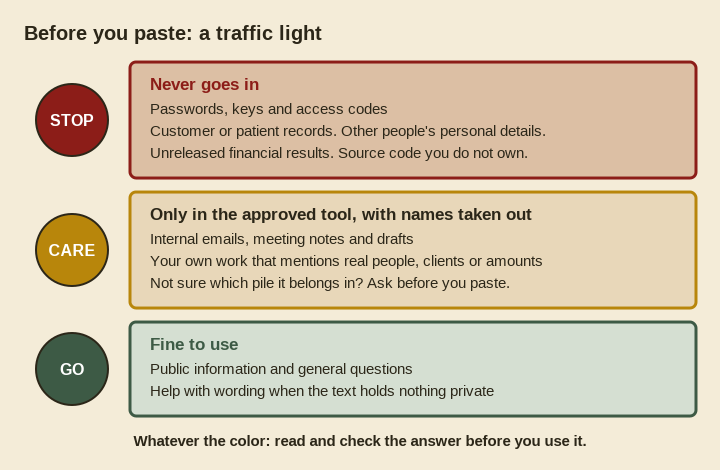 Red never goes in. Amber goes only into the approved tool, cleaned up first. Green is fine.
| Never paste | Why |
|---|---|
| Passwords, access keys, security codes | Anyone who can read the stored chat can use them. A key (a long code that lets one program sign in to another) is a password by another name. |
| Customer, patient or student records | They belong to the people in them, and privacy law and contracts usually limit where they may go |
| Unreleased financial results or deal terms | Early disclosure can break the law and your employment contract |
| Source code or documents you do not own | Your employer's or a client's property is not yours to hand to a third party |
| Other people's personal details | A coworker's health, pay, address or review is theirs to share, not yours |
NIST's profile of the risks of generative AI (NIST AI 600-1, July 2024) names the same dangers in its own words. Its data privacy risk covers leakage and unauthorized disclosure of health, location and other personal information. Its intellectual property risk includes eased exposure of trade secrets.
Watch out
The slip that catches careful people is the long paste. You copy an error message to ask what it means, and forty lines down it holds a password or a customer's name. Read the whole thing before you send it, including the part you have to scroll to see.
What needs care
Much of working life sits between the two piles: an internal email you want shortened, notes from a meeting, a draft plan. None of it is secret, yet none of it is public.
For this middle ground, two conditions apply together. Use the tool your employer approved, since that is the one whose terms someone has read. And strip the text first.
Three safer habits
Take the names out. Swap real names for "Customer A" and "Manager B." Round the amounts. Remove account numbers, addresses and dates of birth. The assistant can still fix your grammar or restructure your argument. Be modest about how far this goes, though. A description can point to one person even with the name removed. "The only cardiologist at our clinic in a town of 4,000" is not anonymous.
Use the approved tool. The guidance tells organizations to find out whether a third-party tool uses their inputs to retrain its model, and to consider private versions where they exist. Your IT team may have done that work and chosen a version with stronger terms. A personal account on the free version of the same product may have different ones. Signing in with your work account is part of the protection.
Check the answer. That needs its own section.
Four things to do before your next paste:
- Find your employer's policy on AI tools, or ask who owns it
- Find out which assistant is approved, and sign in to it with your work account
- Open that tool's settings and read what it says about keeping your chats and training on them
- Look back through your old chats for anything on the red list
Tip
Ask for a pattern, not a rewrite of the real thing. In place of pasting the contract, ask "how would I word a clause that limits liability to the fees paid?" You get the help and the contract never leaves your computer.
The answer can be wrong
A chat assistant writes fluent, confident text whether or not it is true. NIST calls this confabulation: "the production of confidently stated but erroneous or false content." Most people call it hallucination. The joint guidance says flatly that outputs "may not always be accurate or factually correct."
The guidance gives a case worth remembering. In 2023 a judge in New York reportedly found that a legal brief filed in his court cited at least six cases that did not exist. The lawyer said he had used a chat assistant for research and was unaware its content could be false.
So treat the answer as a draft from a quick, well-read intern who sometimes makes things up and never says so.
- Check every number, date, name, quotation and legal or medical claim against a source you trust.
- Test formulas and code on sample data before you rely on them.
- Read anything that goes out under your name, all the way through.
You are still the author. If the answer is wrong, it is your email that was wrong.
If you already pasted something
It happens, and it is fixable if you move quickly. Do not hide it.
- Stop, and note what you pasted, into which tool, and when.
- If it was a password or key, change it now.
- Tell your manager or the security team the same day.
- Delete the chat if the tool lets you, and tell the security team you did.
- Ask which tool is approved, and use that one from now on.
Deleting the chat may not remove every copy, which is why the password change comes first and the report comes next. Our article The First Hour: The Incident Response Lifecycle explains what the security team does with a report like yours.
What to remember
- Your text leaves your computer. Whether it is kept or reused depends on the product and the plan, so read your employer's policy and the product's own terms.
- Never paste passwords and keys, customer or patient data, unreleased financials, code you do not own, or other people's personal details.
- For everything in between: the approved tool, with the names taken out.
- Read long pastes to the end before sending.
- The answer can be confidently wrong. Check it before it carries your name.
- If you slip, change the secret and report it the same day.
Tomorrow morning, find your employer's AI policy and read it. If there is none, ask for one. That question does more for your workplace than any setting you can change on your own.