
For entertainment purposes only. Written by members for play in our gaming community. It is not official military instruction or medical, tactical, legal, or safety advice, it may be wrong or out of date, and it does not qualify anyone to use real vehicles, weapons, radios, or other equipment. Do not rely on it in real life: get proper training, follow the law and the equipment's own manual, and use anything here at your own risk (Terms of Use, section 10).
Our game servers run the unit's own mod, WD_ServiceRecord. It notes every kill and death that involves a player and sends them to this site about once a minute. Linking tells the site which game account is yours, so those numbers land on your service record. It takes about two minutes and you only do it once per game account.
You do not install anything. The mod runs on the server only, so there is nothing to download and nothing changes in your game.
What you need
- An account on this site, and to be signed in. Discord or email, either works (see below).
- Arma Reforger, and a way onto one of our servers. The Servers page lists them.
- This page or your Settings open on a phone or a second screen helps, but you can also write the code down.
No Discord? No problem
You do not need a Discord account to link your service record. On the sign in page, open No Discord? Sign in with email, give your email address, the callsign you want, and your Arma Reforger name, and follow the link we send you. Your in-game name is optional, but it helps our admins find you on our servers. You set up an authenticator app first, to keep the account safe.
An email account starts as a guest. Our admins verify it by hand, and that normally does not take long: all we need to know is that you play on our servers. You can also do it yourself, straight away: linking your game account (the steps below) proves you play with us, so it verifies you on the spot. Either way, get verified within 14 days, or the account is deleted.
Prefer Discord after all? Most of the unit talks there, and you can sign in with it at any time. The sign in page shows how to get it: open Rather use Discord? Here is how.
Step by step
- Get a code. On the site, open Settings (your account menu, then Settings) and scroll to Service record. Press Get a link code.
- Read the code. A box appears with a line like
#servicerecord 7KQ4PZ. The code is 6 letters and numbers. It works once, for 15 minutes, and the box shows the time it runs out. - Join one of our servers in Arma Reforger. Once you are in, give it a minute before the next step: the mod needs a moment to know who you are.
- Type the line in chat. Open the in-game chat and type
#servicerecord, a space, and your code, then send it. For example:#servicerecord 7KQ4PZ. Capitals do not matter, and dashes are fine. - Watch for the reply. The server answers in chat: Got it. Your code is on its way. That means the server took your code and will pass it to the site.
- Check the site. After about a minute, refresh Settings. Under Service record you should see Linked and your in-game name, with the date. That is it: you can keep playing.
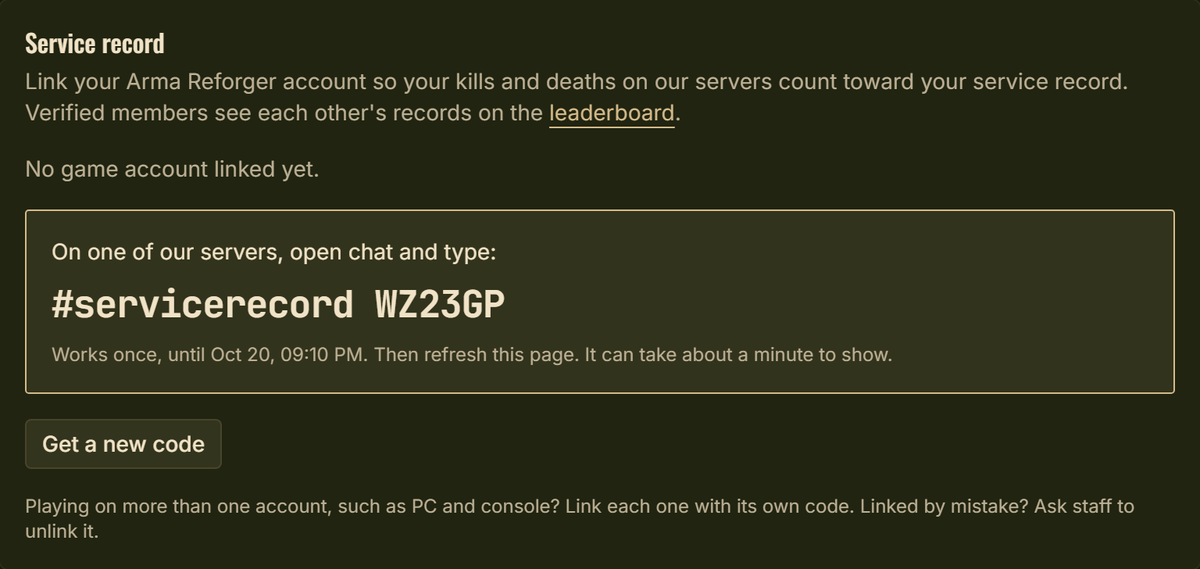 Settings, Service record, after pressing Get a link code. Type the line exactly as shown in game chat. Screenshot of this site, sample code.
The "Got it" reply only means the server sent your code on. The site does the checking, so if Settings does not say Linked after a couple of minutes, see Troubleshooting below.
More than one game account
Playing on PC and on console, or on two accounts? Link each one the same way, each with its own code. Once one is linked, the button in Settings reads Link another account. Your record adds them all together.
What you get once linked
- Your service record. Kills of enemy AI, PvP kills, deaths, and your longest kill, shown in a Service record panel on your profile. My service record in your account menu goes straight to it.
- A place on the leaderboard. Service records, under Roster in the menu, ranks members by kills, K/D, PvP kills, longest kill, or deaths. First, second, and third place wear a medal.
- Awards that follow your record. The Combat Badge for your first confirmed kill of an enemy, with stars as the count climbs, and the Marksmanship Badge for your longest kill. Nobody has to hand these out: they appear on their own.
- Who was there. Finished operations list the linked members our servers saw while the operation ran, so your attendance shows.
- One less order on your dashboard. "Link your game account" drops off your list of orders on its own.
- Verification, for email accounts. If you signed up with email rather than Discord and are still waiting to be verified, linking verifies you: it proves you play on our servers. You become a member with the rank of Private First Class and get a notification.
Your record counts what our servers recorded for that game account, including play from before you linked, back to when the servers began recording.
Who can see it
Kills and deaths are for verified members only, on the leaderboard and on profiles. That includes members whose profile is private. Guests and visitors who are not signed in see nothing of yours. The home page shows only everyone's numbers added together, with no names. Teamkills, and the full log of every kill, are for staff only.
What does not count
- Kills made while you have the full Game Master editor open, or while you are controlling an AI in Game Master. A possessed AI dying does not count against you either.
- AI killing AI, and destroyed empty vehicles.
- Play on servers that are not ours.
Troubleshooting
Here is what each reply from the server means, and what to do.
- "To link your service record, type #servicerecord and the code..." You sent the command without a code. Type it again with the code after a space.
- "That code doesn't look right." The code was not 4 to 12 letters and numbers. Copy it again from Settings, and check for a stray character.
- "Please wait a few seconds before trying again." You tried twice within ten seconds. Wait a moment and send it once.
- "Your account isn't ready yet." You only just joined. Wait a minute after joining, then try again.
- "Service record linking isn't switched on for this server yet." That server is not sending to the site. Try another of our servers, and tell staff which one said it.
If the server said Got it but Settings still says No game account linked yet after a couple of minutes:
- Refresh Settings. The page does not update itself.
- The code may have run out. Codes last 15 minutes from when you pressed the button. If the box is gone, or its time has passed, press Get a new code and try again. Getting a new code cancels the old one, so always type the newest.
- The code works once. If you already used it, get a new one.
- Check for typos. The codes leave out 0, O, 1, and I so they are easy to read. If you see one of those, you have misread a character.
- Too many codes. You can make up to 10 in an hour. After that, Settings says to try again later.
Still stuck? Ask staff in Discord and say which server you were on and roughly when you typed the code.
Linked the wrong account?
There is no unlink button. Ask staff to unlink it, then link the right one with a new code.
Version 3, updated .