Articles & BlogBy Trapper W. Brown7 min read
For anyone who travels with a phone or a laptop, which is nearly everyone.
Your phone is your map, your wallet, your boarding pass and your way home. So what should you worry about when you carry it across a border and connect it to networks you have never seen?
Less than the scarier headlines suggest, and a little more than nothing. Most of the risk to a traveler's device is plain: it gets lost, stolen or broken. The technical risks are real but smaller, and a few calm habits cover them. This article goes through the three questions I hear most: public Wi-Fi, public charging, and what happens to your devices at the border.
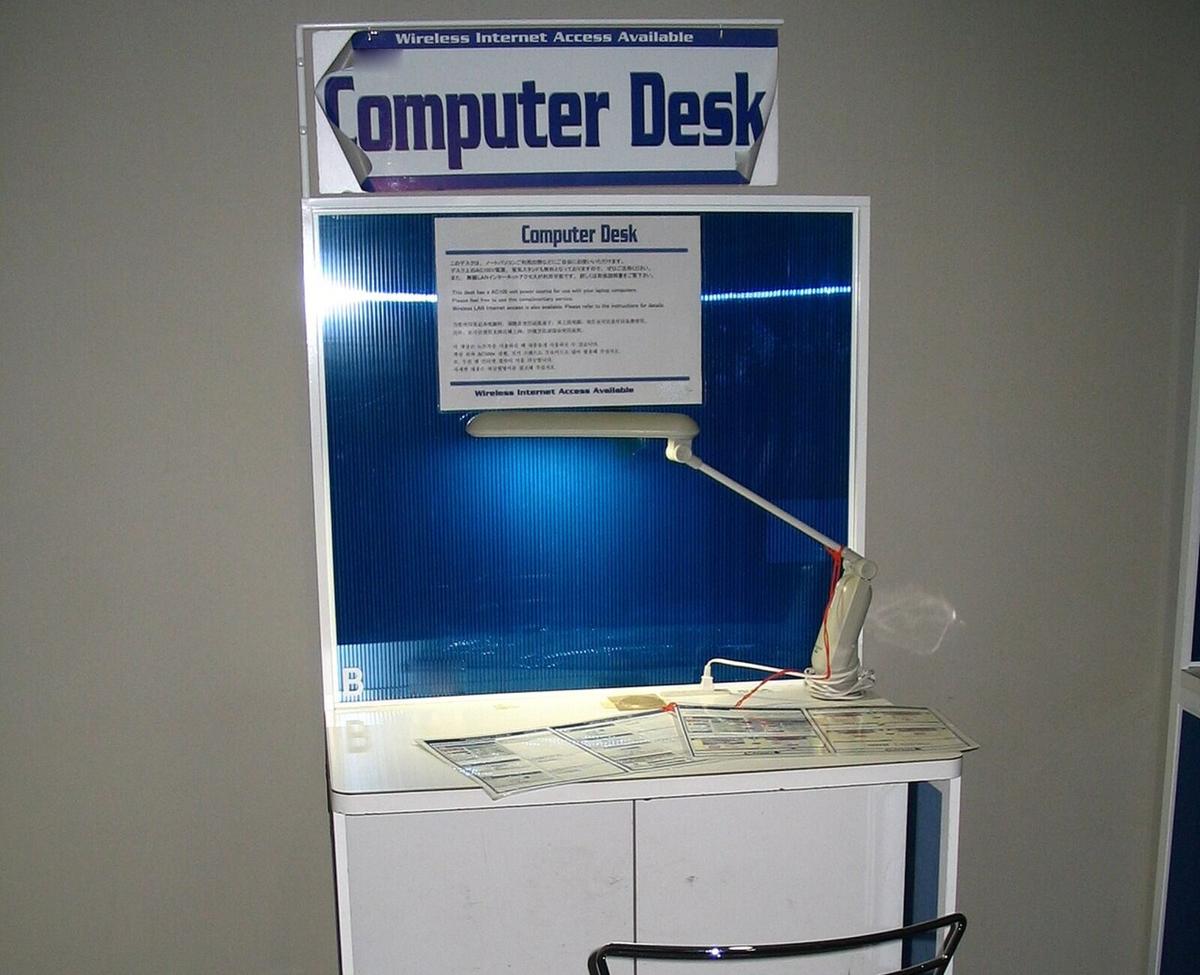 Free power and free internet for travelers, at a desk in Narita Airport: convenient, and worth a moment's thought. Photo by D Coetzee, CC0 public domain dedication, via Wikimedia Commons.
I wrote this for US travelers going abroad, and the border section is about returning to the United States. The Wi-Fi and preparation advice applies to anyone, anywhere.
Is public Wi-Fi safe?
It depends on which federal agency you ask, and I think you deserve to hear both answers.
| Agency | What it says | What that means for you |
|---|---|---|
| Federal Trade Commission (2023) | Connecting through public Wi-Fi "is usually safe", because most websites are now encrypted | Look for the lock or https in the address bar |
| Federal Bureau of Investigation | Avoid sensitive transactions on a public network | Save banking for a connection you trust |
| Cybersecurity and Infrastructure Security Agency (CISA) | Confirm the network's name and password with staff before connecting | Ask at the desk, do not guess |
These are less opposed than they look. The FTC is describing how the web has changed. Years ago, much of what you sent over a cafe network could be read by someone else on it. Today most sites encrypt the connection between your device and the site, so a stranger on the same network sees very little. That is what the lock or https tells you.
The FBI is making a more cautious point: you do not control a public network, so why run your most sensitive business across it when you could wait? Both are reasonable.
Here is how I put them together. For reading the news, checking a map, or messaging in an app that encrypts its traffic, public Wi-Fi is fine. For your bank, your work accounts or anything that asks for a password you would hate to lose, use your phone's mobile data, or wait until you are on a network you trust.
Confirm the network name first
How does the trouble on public Wi-Fi usually start? With a network that is not the one you think it is.
Anyone can set up a network and call it whatever they like. A name that looks like the hotel's, the airport's or the cafe's is easy to mistake for the real thing, and your device will join it without complaint. CISA's advice deals with this directly: confirm the network's name and its password with staff before you connect.
So ask. At a hotel, the name is usually on the key sleeve or a card in the room. At a cafe, ask the person at the counter and read the name back. If two networks have nearly the same name, do not choose the one with the stronger signal and hope. Ask which is theirs.
A few habits go well with that advice:
- Turn off the setting that joins open networks automatically.
- Tell your device to forget a public network when you are done with it.
- If a page shows a certificate warning, stop. Do not click past it.
Watch out
A sign-in page on public Wi-Fi that asks for your email password, your bank login or a card number "to verify your identity" is not a normal part of getting online. Close it, disconnect, and ask staff for the right network.
Charging in public
Should you plug into the USB port at the airport gate? You will find strong opinions on this. I looked for a current official source to quote and could not verify one, so I will not put an agency's name on a warning here.
What I can say is that the question is easy to step around. Carry your own charger and cable and plug into an ordinary wall outlet. Then it does not matter what is behind the USB port, because you are not using it. A small battery pack does the same job and saves you hunting for an outlet at all.
What happens at the US border?
Can an officer look through your phone when you come home? Yes. US Customs and Border Protection (CBP) can search electronic devices at the border, and it publishes how often it does.
In fiscal year 2025, CBP reports that 55,318 international travelers had a device searched, out of more than 419 million travelers processed. That is less than 0.01 percent. For nearly everyone, the border search of a phone is something that happens to other people.
Three more points from what CBP publishes are worth knowing:
| Question | What CBP says |
|---|---|
| Can a US citizen be refused entry over it? | A US citizen will not be denied entry over an incomplete inspection |
| Can they keep the device? | The device may be detained |
| Can they look at my cloud accounts? | Officers may not use the device to reach information stored only remotely |
Read the first two together. A citizen comes home either way, but the phone or laptop may stay behind for a while. That is the practical cost to plan for, and it is the reason a backup matters.
This section is information about what CBP publishes, not legal advice, and a lawyer is the right person to ask about your own situation. The rules for visitors to the United States are different from those for citizens, and every other country sets its own. If you are entering somewhere with a reputation for close inspection, read that country's rules before you fly.
Tip
If an officer keeps a device, ask for the paperwork that records it before you leave the inspection area, and write down the officer's name and the time. Stay polite. Arguing at the counter helps nobody, least of all you.
Prepare before you leave
Nearly everything that goes wrong with a device abroad (theft, loss, a cracked screen, a search that ends with the laptop staying behind) is softened by the same three steps.
| Step | Why it helps |
|---|---|
| Update | Install system and app updates at home, on your own network, before you go |
| Back up | A full backup at home means a lost device costs you money, not memories |
| Carry less | Data that is not on the device cannot be lost, stolen or looked through |
"Carry less" deserves a second look. Do you need three years of work files on the laptop you take to a conference? Do you need every account signed in on the phone you take to the beach? Remove what you will not use on this trip and put it back when you are home.
- Install updates on every device you are taking
- Make a full backup and leave it at home
- Set a screen lock with a passcode, and turn on the find-my-device feature
- Remove files and sign out of accounts you will not need on the trip
- Turn off automatic joining of open Wi-Fi networks
- Pack your own charger, cable and a battery pack
- Write down the numbers to cancel your cards and suspend your phone service, on paper
What to remember
- The FTC says public Wi-Fi is usually safe. The FBI says keep sensitive business off it. Both can be right.
- CISA: confirm the network name and password with staff.
- Your own charger in a wall outlet settles the charging question.
- CBP searched the devices of 55,318 travelers out of more than 419 million in fiscal year 2025.
- A US citizen will not be denied entry over an incomplete inspection, but the device may be detained.
- Update, back up, and carry less.
The device most likely to ruin your trip is the one left in the back of a taxi. If you have a backup at home, a lock on the screen and less on the device than usual, you have dealt with that case, and with most of the others as well.