Articles & BlogBy Trapper W. Brown10 min read
On the back of many televisions, game consoles, soundbars and receivers made in the last few decades there is a small square port with a hinged flap, usually labeled "optical" or "digital audio out." Open the flap with the device switched on and a red light glows inside. That light is the sound. An optical audio cable carries digital audio as rapid pulses of red light through a plastic fiber, with no electricity passing between the two devices at all.
Why should you care about a port that HDMI was supposed to retire? Because it is still on a great deal of equipment, it still solves one annoying problem better than anything else, and its limits explain why a new soundbar sometimes plays plain surround when the box promised more. Knowing what fits through that little red beam, and what does not, will save you a return trip to the store.
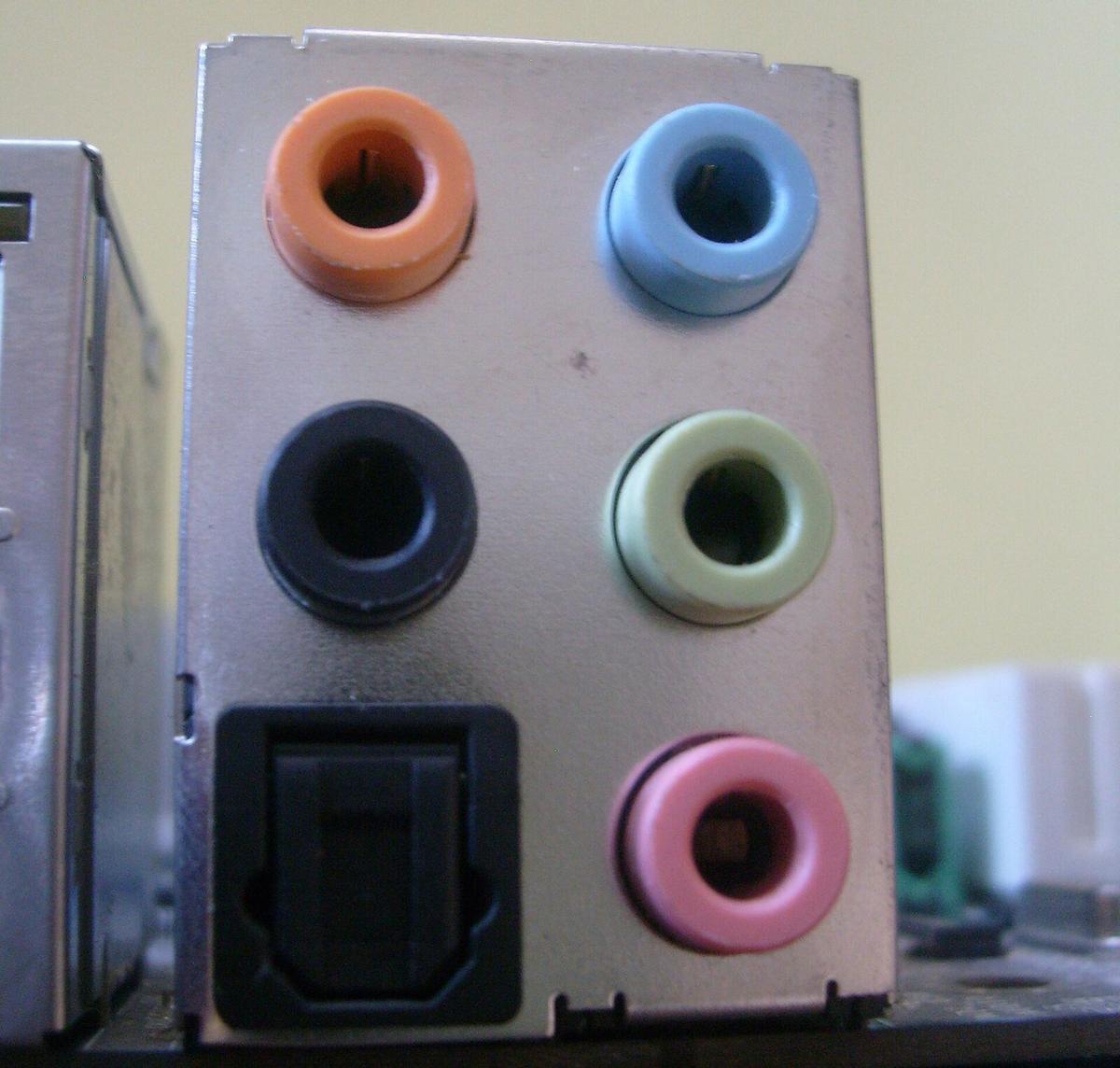 The square port at the lower left is the optical output, and the round jacks beside it carry ordinary analog sound. Photo by Angelarmandol, public domain, via Wikimedia Commons.
How does sound become light?
Digital audio is a long list of numbers. A recorder measures the sound wave many thousands of times a second and writes each measurement down in binary, as ones and zeros. The article "The Nyquist Theorem: Why Sampling Works" in this set explains why that list is enough to rebuild the sound, so this guide starts from the numbers.
To send those ones and zeros across the room, the source needs something that can be in two states. An optical output uses a light: on and off. Inside the port is a tiny transmitter with an LED (a light-emitting diode). Inside the port on the other device is a sensor that turns light back into an electrical signal. Between them runs a fiber that keeps the light from leaking away.
How fast does the light blink? Work it out for ordinary stereo sound. Two channels, each measured 48,000 times a second, each measurement 24 bits long, comes to 2 × 48,000 × 24 = 2,304,000 bits every second, before a few housekeeping bits are added. The LED flickers millions of times a second. To your eye it is a steady red glow.
The name TOSLINK comes from Toshiba, the company that makes these transmitter and receiver modules and still marks the name as its trademark. Its own specification pages for general-purpose modules give a sense of the hardware: red light at a wavelength of 650 nanometers, sent into an all-plastic fiber with a core just under 1 millimeter across.
That wide plastic core is the big difference from the fiber that carries the internet. A glass internet fiber has a light-carrying core about 9 micrometers wide and runs for miles, as "Fiber Optic Internet: Light in Glass, Explained" describes. The plastic core of an audio cable is roughly a hundred times wider. That makes it cheap and easy to line up with an LED by simply clicking a plug into a socket. It also loses light quickly, which is fine, because the cable only has to cross a living room. The same principle keeps the light inside both kinds of fiber, and that article covers it.
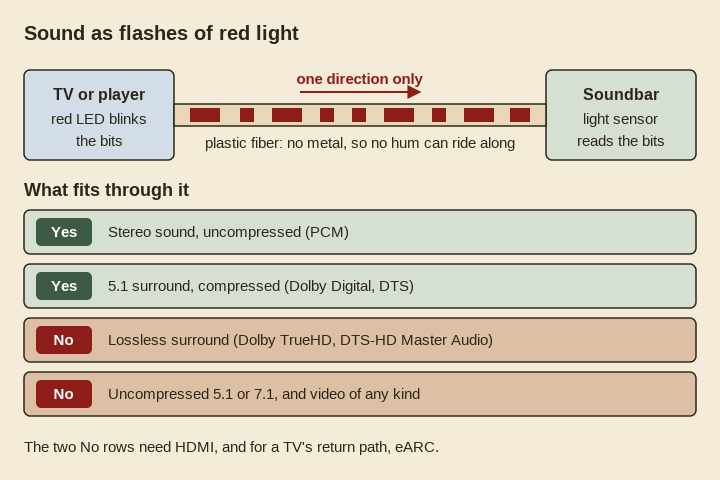 The light travels one way, carries no electricity, and has room for stereo or compressed surround and nothing larger.
What is S/PDIF?
The cable is only the road. The traffic rules are called S/PDIF, short for Sony/Philips Digital Interface, after the two companies that defined it for home equipment. Today the rules live in an international standard, IEC 60958, whose third part covers consumer equipment. The current editions are dated 2021.
The standard's own summary describes the interface in four terms worth unpacking:
- Serial. The bits go one after another down a single path.
- Uni-directional. One device talks and the other listens. Nothing comes back, so the source cannot ask the soundbar what it is able to play.
- Self-clocking. The timing is folded into the stream of pulses, so the receiver recovers the beat from the light itself and needs no second wire for a clock.
- Primarily for mono or stereo. It was designed to carry one or two channels of plain digital audio, at up to 24 bits per sample and at sampling rates of 32 kHz and above.
That plain form is called linear PCM (pulse-code modulation): the raw list of measurements, with nothing squeezed out.
The same S/PDIF signal can also travel as electricity down a copper cable with a single round plug. That version is called coaxial digital audio. The two carry identical data. Only the road differs.
What can it carry, and what can it not?
Think of the connection as a pipe sized for two channels of uncompressed sound. Anything that fits inside that pipe can go. Anything larger cannot.
Stereo PCM fits, because the pipe was built for it. For music in two channels, optical delivers every bit.
Compressed surround fits. A companion standard, IEC 61937, describes how to pack audio that is not plain PCM into the same stream. One part of it covers AC-3, which is the technical name for Dolby Digital. Another covers DTS. Dolby describes Dolby Digital as delivering up to 5.1 channels (five speakers and a bass channel) at 384 or 448 kilobits per second on DVD and 640 on Blu-ray Disc. That is far smaller than stereo PCM, so six channels of compressed sound slip through a pipe made for two uncompressed ones. The receiving device does the unpacking.
Lossless and uncompressed surround do not fit. The arithmetic shows why.
| What you want to send | Size of the stream | Through optical? |
|---|---|---|
| Stereo PCM, 48 kHz, 24-bit | About 2.3 megabits per second (worked above) | Yes |
| Dolby Digital 5.1 | Up to 0.64 megabits per second on Blu-ray (Dolby) | Yes, compressed |
| Uncompressed 5.1 PCM, 48 kHz, 24-bit | 6 × 48,000 × 24 = about 6.9 megabits per second | No |
| Dolby TrueHD | Up to 18 megabits per second on Blu-ray (Dolby) | No |
Dolby TrueHD is a lossless format: Dolby says it unpacks to exactly what the studio made, and it is much larger for it. Dolby's specifications list TrueHD as transported over HDMI. It appears, along with DTS-HD Master Audio and the newer Dolby Atmos and DTS:X, on the HDMI organization's list of what its enhanced audio return channel supports. None of that is on offer through the optical port.
What happens in practice when you play such a soundtrack over optical? The source usually falls back to a plain 5.1 or stereo version. You still get sound. It is simply the older, smaller version of it.
Tip
If a soundbar connected by optical is silent, open the TV's audio settings and change the digital output from "Auto" or "Bitstream" to "PCM." The TV was probably sending a format the soundbar cannot unpack. PCM is stereo, and everything understands it.
Why is it immune to electrical hum?
This is the thing optical does better than any copper connection.
Here is a common household case. A desktop computer in one corner is plugged into one wall outlet. A stereo receiver across the room is plugged into another. An ordinary audio cable connects them. Now there is a loop: from the wall, through the computer, along the audio cable's metal shield, through the receiver and back to the wall. Small differences in voltage between the two outlets push a current around that loop, and the receiver amplifies it faithfully. You hear a low, steady hum, sometimes with a buzz that changes when the computer works harder. Technicians call it a ground loop.
An optical cable is plastic from end to end. It has no metal for a current to follow, so the loop is broken and the hum has no path. The two devices are electrically separate, and only light crosses the gap. For the same reason, an optical cable does not pick up interference from the power cords it lies next to, and it does not radiate any of its own.
So for one person with a computer and a pair of powered speakers that buzz, a short optical cable is often the cheapest cure. For a household with a television, a game console, a cable box and a receiver all tied together with metal cables, moving one stubborn device to optical can break the loop that is causing the noise.
How does it compare with coaxial, HDMI ARC and eARC?
| Optical | Coaxial digital | HDMI ARC | HDMI eARC | |
|---|---|---|---|---|
| What carries the signal | Light in plastic fiber | Electricity in one copper cable | The HDMI cable already feeding the TV | The same HDMI cable |
| Stereo PCM | Yes | Yes | Yes | Yes |
| Compressed 5.1 | Yes | Yes | Commonly, check the manual | Yes |
| Lossless and uncompressed surround | No | No | Not what it was built for | Yes |
| Electrically separate | Yes | No | No | No |
Coaxial is the same S/PDIF data on copper. It is sturdy and its plug is hard to break. Because it is metal, it can complete a ground loop.
HDMI ARC stands for audio return channel. HDMI normally sends picture and sound from a player to a TV. ARC, in the HDMI organization's words, lets a TV send audio "upstream" to a receiver or soundbar through the same HDMI cable, so no separate audio cable is needed. An HDMI connection can also pass control commands between devices, which is how one remote can often adjust a soundbar's volume. Optical cannot do that, because nothing travels back along it.
HDMI eARC, the enhanced version, is where the large formats live. The HDMI organization lists it as supporting audio up to 192 kHz and 24-bit, uncompressed 5.1 and 7.1, and the lossless and height formats named above. The fact that these are listed as features of eARC tells you plain ARC was not built for them. What a particular TV sends over plain ARC varies by model, so the manual is the authority.
How do you take care of the cable?
- Take the caps off. New cables ship with small clear caps on the tips. More than a few "broken" cables are simply still wearing them.
- Push until it clicks. The plug is keyed and goes in one way. A half-seated plug dims the light.
- Do not kink it. A gentle curve is fine. A sharp fold can crack the fiber or let the light leak out at the bend. Do not pinch it behind furniture.
- Keep the tips clean. Dust on the end blocks light. Put the caps back on when the cable is stored.
- Keep it short. Plastic fiber loses light quickly. Buy the length you need and no more.
- Use the glow as a test. With the source on, unplug the far end. A red dot at the tip means the source and the cable are working. (It is a small LED, but do not stare into it.) No glow means the output is switched off in a menu or the cable is damaged.
You do not need an expensive one. The cable either delivers the bits or it does not, and a short, undamaged, inexpensive cable delivers them.
When should you still use it?
Use optical when:
- Your receiver, soundbar or speakers have no HDMI input, or the TV's ARC connection keeps misbehaving.
- You have a hum or buzz that goes away when a metal audio cable is unplugged.
- You are listening in stereo. Two-channel PCM over optical is complete, with nothing left out.
- You want sound from a console or computer to a headphone amplifier or desktop speakers and nothing more.
- Compressed 5.1 is all your speakers can use anyway.
Use HDMI with eARC when both your TV and your sound system support it and you want the lossless or height formats, or you want one remote to run everything.
What to remember
- Optical audio sends digital sound as pulses of red light through a plastic fiber. No electricity crosses between the devices.
- The data format is S/PDIF, standardized as IEC 60958. It runs one way, carries its own timing and was sized for stereo.
- It carries stereo PCM and compressed 5.1 surround such as Dolby Digital and DTS. It does not carry lossless or uncompressed surround, which need HDMI.
- Because the cable has no metal, it cannot carry a ground loop, which makes it a reliable cure for hum.
- Coaxial is the same data on copper. ARC returns sound over HDMI. eARC is the version with room for the largest formats.
- Remove the caps, click it in, do not kink it, and look for the red glow.
If your system hums, try the optical port before you buy anything else. And if you have not read it yet, "The Nyquist Theorem: Why Sampling Works" explains where the numbers riding on that red light came from.